Leads & Pipeline
Raya runs two connected lead systems. A public lead capture form collects the prospect's details; the moment they submit, Raya creates a CRM lead in your sales pipeline. This page builds the form first, then works a real enquiry from New to Won.
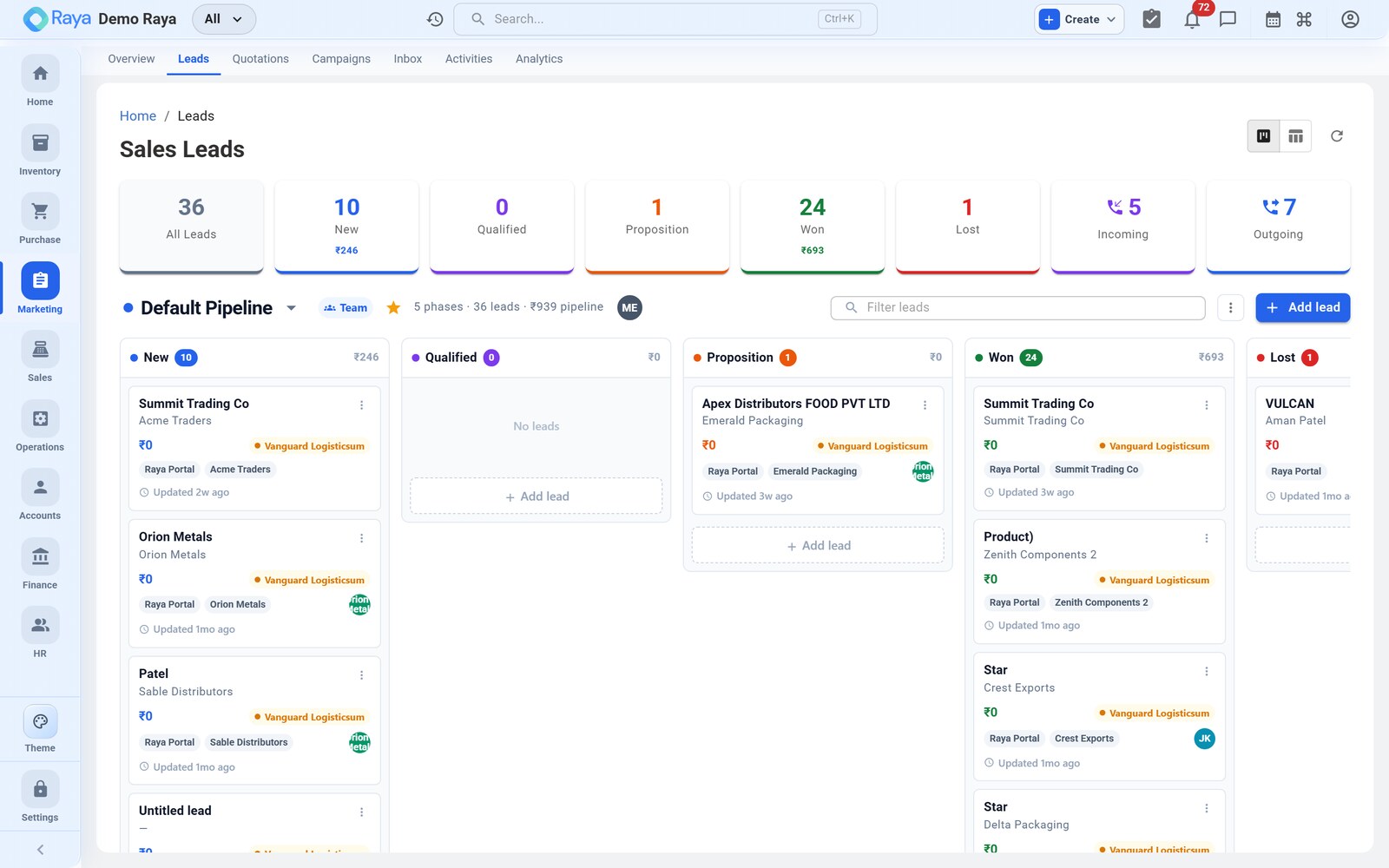
Worked example (used throughout): the distributor Meridian Supplies finds your Get a Quote page, asks for 8 MT (8,000 kg) of LDPE Film, and hits submit. We'll build the form that captured them, then push the lead through the pipeline to an order.
:::info Two systems, one flow
| System | Where | Who uses it |
|---|---|---|
| Lead Capture Forms | Marketing → Lead Forms | Marketing — public forms, landing pages, ad campaigns |
| CRM Leads | Marketing → Leads (Alt + L) | Sales — the internal pipeline worked to closure |
Every form submission automatically becomes a CRM lead in status New. :::
Part 1 — Build a lead capture form
Go to Marketing → Lead Forms → + New Form. The builder has four sections: identity, fields, behaviour, and publishing.
How to fill it — step by step
-
Form name (internal) — what your team sees in the list, e.g.
Get a Quote — Packaging Films. Prospects never see this. -
Title and subtitle (public) — the heading on the live page, e.g. title "Get a Quote", subtitle "Tell us what you need and we'll price it within a day."
-
Branding — logo and colours. These default to your tenant brand; override the accent colour or swap the logo if the form sits on a partner's microsite.
-
Add fields — drag field blocks into the form. Mark the ones you can't work a lead without as required:
Field Type Meridian's answer Required? Company text Meridian Supplies Yes Contact name text Priya Nair Yes Work email email priya@meridian.example Yes Phone phone +91 98xxxxxx Yes Product interested in dropdown LDPE Film Yes Estimated quantity number 8000 (kg) No Requirement notes textarea "8 MT, recurring monthly if rate works" No Spec sheet file upload — No Available field types: text, email, phone, number, dropdown, multi-select, date, textarea, file upload.
-
Thank-you message — shown after submission, e.g. "Thanks, Priya — your enquiry
#{id}is in. A specialist will call you within one business day." -
Notification settings — pick which users are emailed when a submission arrives, so a fresh prospect is picked up quickly.
-
Expiry & limits (optional) — set a valid-until date and/or a maximum submission count, e.g. close the form after the festive campaign ends or after 500 entries. Past the limit, the form politely stops accepting.
-
Publish. Raya returns three ways to share it:
- a public URL — e.g.
yourco.raya.app/lead/get-a-quote; - an embed code to drop into your website;
- a QR code for print — catalogues, stall banners, product cartons.
- a public URL — e.g.
:::tip Put the QR on the carton Because the QR resolves to the same form, a distributor scanning a printed catalogue and a visitor clicking the website link both land in the same pipeline — with the source recorded so you can tell which channel actually produced deals. :::
Submissions & form analytics
Every submission appears under Lead Forms → [form] → Submissions, and each one:
- captures all field values exactly as entered;
- records the source URL, IP address and timestamp;
- auto-creates a CRM lead in status New, tagged Source = Website.
The form also tracks clicks and submissions, so you can see how many people viewed the form versus how many completed it — a simple conversion read on each channel.
:::note What isn't tracked Form-level view/click/submission counts are available. Email open and click tracking on campaigns is not — gauge campaign engagement from replies in the Inbox, not opens. :::
Part 2 — Work the lead through the pipeline
Meridian's submission is now a lead in New. Open Marketing → Leads (Alt + L) to find it. Leads move left-to-right through the pipeline, with Lost and On Hold as off-ramps:
New → Qualified → Proposition → Won
| Stage | What it means | Meridian's moment |
|---|---|---|
| New | Captured; no contact made yet | The form just landed |
| Qualified | You've spoken to the prospect and confirmed a real opportunity | Rep calls Priya, confirms 8 MT is genuine and recurring |
| Proposition | A quotation has been sent | The ₹120/kg quote PDF goes out |
| Won | Quote accepted and converted to a Sales Order | Meridian confirms; a Sales Order is created |
| Lost | Prospect declined — record a lost reason | (e.g. "went with incumbent on price") |
| On Hold | Waiting on the customer or a pending decision | Buyer paused pending a spec approval |
You advance a lead by opening it and moving it along the pipeline stepper, or by setting the stage on the Overview tab.
:::note Stepper, not drag-and-drop Raya's pipeline is a stepper / list view, not a drag-drop Kanban board. Advance a lead by opening it and stepping it forward — every stage change is written to the activity timeline. :::
Score, assign and prioritise
Fill these on the lead's Overview tab so the right rep works the hottest deals first:
- Lead score — a numeric score that surfaces the strongest opportunities at the top of the list. Meridian scores high: known distributor, clear quantity, recurring intent.
- Owner — assign a sales rep; the lead then appears on their dashboard. Assign Meridian to the packaging-films rep.
- Expected value & probability — e.g. ₹9,60,000 at 60% once qualified. These feed the pipeline forecast by stage.
- Source — pre-filled Website from the form (others: Campaign, Referral, Manual) — powers source-attribution reporting.
- Contact link — link the lead to an existing customer/contact record, or let the later conversion wizard create one. See Contacts.
The lead detail page — five tabs
| Tab | What lives here |
|---|---|
| Overview | Contact, company, source, owner, score, expected value & close date, custom fields |
| Interactions | Every call, meeting, note and message — see Activities & Calendar |
| Follow-ups | Scheduled next steps with reminders |
| Quotations | Quotes sent, with status and version history — see Quotations |
| Documents | Brochures, spec sheets, signed quotes and other attachments |
Never miss a follow-up
From the lead, schedule a follow-up with a due date and time, an assignee (defaults to the lead owner), and a reminder by email and portal notification before it falls due. For Meridian the rep sets "Call back Tue 11:00 AM — walk through revised rate." Open follow-ups due today also surface on the owner's Today dashboard widget.
:::tip Next step = follow-up, automatically When you log a call and fill in a Next step + due date, Raya creates the follow-up for you — no separate step. See Activities & Calendar. :::
What happens next
Meridian is now Qualified with a follow-up booked. The rep logs the negotiation call (the ₹115/kg ask) on the Activities tab, then raises the Quotation that moves the lead to Proposition.
Related
- Activities & Calendar — log the calls that qualify a lead.
- Quotations — price and send the proposal.
- Accounts — link a lead to a customer or contact record.
- Lead-to-Cash — the full lead-to-cash cycle.