Quotations
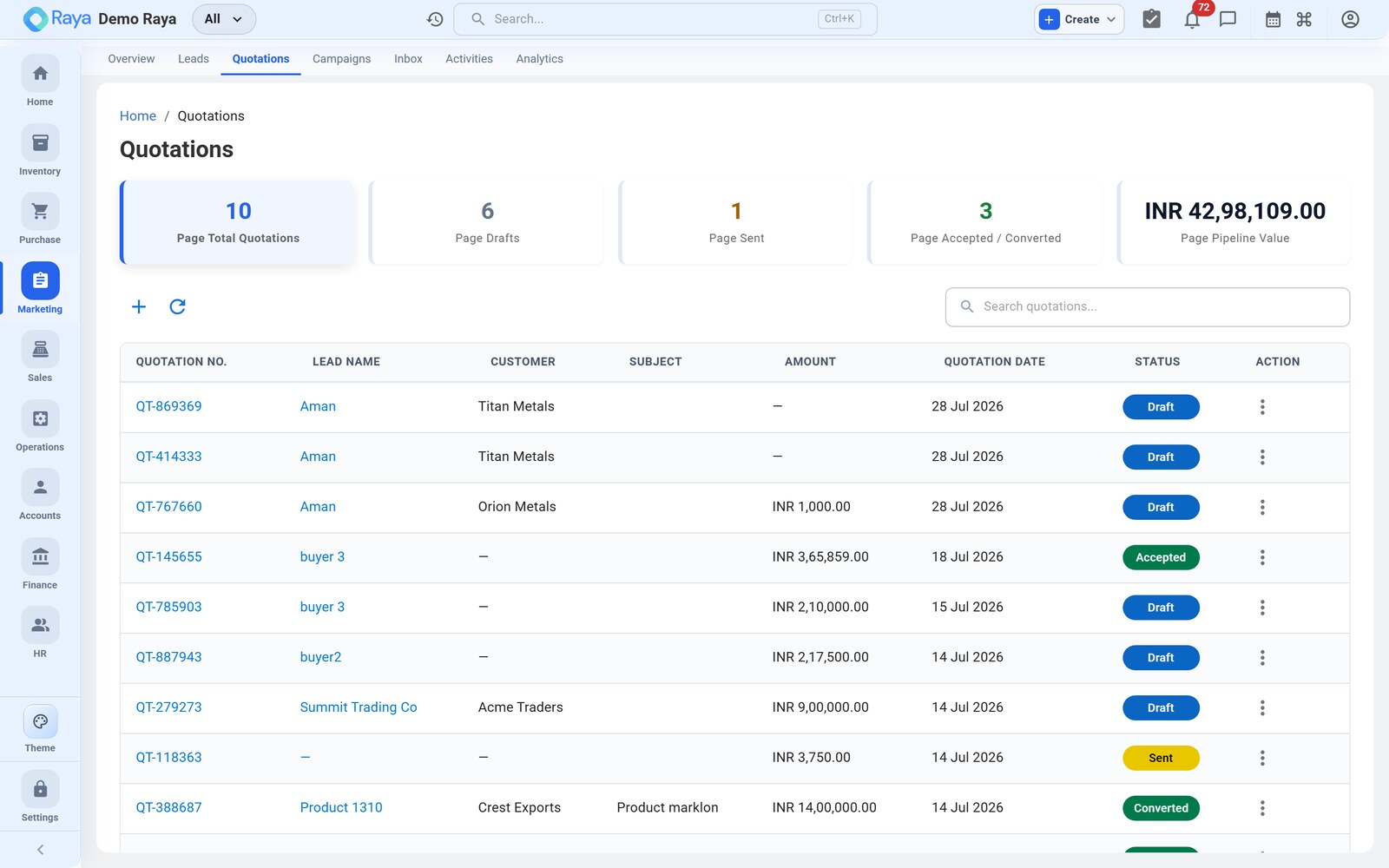
A quotation is a formal price proposal — a proforma invoice — sent to a lead. You create it from the Quotations tab of a lead, price it from live stock, revise it as versions while you negotiate, then convert the accepted quote into a Sales Order in one click.
Worked example (continued): the Meridian Supplies lead is Qualified and wants 8 MT (8,000 kg) of LDPE Film. We'll quote it at the ₹128/kg list rate (v1), then — after the negotiation call — revise to ₹120/kg (v2), send the PDF, and convert to an order once Meridian accepts.
Create a quotation
Open the Meridian lead, go to the Quotations tab, and click + New Quotation.
How to fill it — the header
- Quote number — assigned automatically from the series; leave it.
- Customer / Lead — pre-filled as Meridian Supplies from the lead; the billing contact carries across too.
- Quote date — today.
- Valid until — set an expiry so the price isn't open forever, e.g. +15 days. After this date the offer lapses — useful leverage in a rate negotiation.
- Currency — defaults to your base currency (₹ INR); change only for an export/foreign-currency deal.
How to fill it — the line items
Line items work exactly like a Sales Order: each line pulls from your live catalogue and stock, so you're quoting real, available product.
| Field | Meridian's line | Notes |
|---|---|---|
| Product | LDPE Film | Picks up HSN, UOM and current stock |
| Quantity | 8,000 | In Kg (8 MT) |
| Rate | 128.00 | Per kg — your list rate for v1 |
| Discount | — | Per-line % or amount, if you offer one |
| Tax | GST 18% | Applied per line |
With one line at 8,000 kg × ₹128, the quote totals:
Subtotal (8,000 × ₹128)  ....................  ₹10,24,000
GST @ 18%  ..................................   ₹1,84,320
                                              ------------
Grand total (v1)  ..........................  ₹12,08,320
- Save as a draft. The quote appears on the lead's Quotations tab as v1 (Draft).
:::tip Quote from what you can actually ship Because line items read live stock, the rep can see whether 8 MT of LDPE Film is on hand or needs a production/purchase run before promising a delivery date. Free-text lines are allowed for anything not yet in the catalogue. :::
Version a quotation
Negotiations change the numbers, and you want a clean paper trail — not an overwritten price. On the follow-up call Meridian asks for ₹115/kg; the rep is authorised to offer ₹120/kg (that exchange is captured as an activity — see Activities & Calendar).
To revise:
- Open the quotation and click Save as new version.
- Raya freezes v1 read-only and opens v2 with your changes carried over.
- Change the LDPE Film rate to ₹120.00 and save.
| Version | Rate | Subtotal | GST 18% | Grand total | Status |
|---|---|---|---|---|---|
| v1 | ₹128/kg | ₹10,24,000 | ₹1,84,320 | ₹12,08,320 | Superseded (read-only) |
| v2 | ₹120/kg | ₹9,60,000 | ₹1,72,800 | ₹11,32,800 | Active |
:::note One active version, full history The customer always sees the latest active version on the PDF, while every earlier version stays preserved and read-only. You get the audit trail without the confusion of two live prices floating around. :::
Send it
Click Send Quotation. Raya then:
- generates the proforma PDF (v2, at ₹120/kg) on your branded template;
- emails it to the lead's address (Priya at Meridian);
- moves the lead to Proposition (if it isn't there already).
:::tip Share beyond email You can also download the proforma PDF and share it over WhatsApp or a copied link — handy when the buyer prefers to receive documents on WhatsApp. Sharing this way keeps the same v2 PDF everyone else sees. :::
Convert to a Sales Order
Meridian accepts the ₹120/kg quote. On the quotation, click Convert to Sales Order:
- A wizard pre-fills a Sales Order from the active version — customer, items, quantities and rates all carry across (8,000 kg LDPE Film @ ₹120, GST 18%).
- Adjust if needed — for example, ship a partial 4 MT first and keep the balance for a later release, or tweak the delivery date.
- If Meridian isn't yet a customer account, the conversion wizard creates or links the customer so billing and ledgers are ready.
- Click Create Order. A new Sales Order is created in Pending, and the lead moves to Won.
Quotation v2 (Accepted)  ──►  Sales Order (Pending)  ──►  lead = Won
   8 MT LDPE @ ₹120/kg          same items & rates         no re-keying
From here the deal leaves CRM and continues in Sales and Operations — invoicing, dispatch and payment. See the Lead-to-Cash workflow for the full picture.
Quotation status at a glance
| Status | Meaning |
|---|---|
| Draft | Being prepared; not yet sent |
| Sent | Emailed/shared with the lead; lead is at Proposition |
| Accepted | Customer agreed — ready to convert |
| Rejected | Declined; revise as a new version or mark the lead Lost |
:::note Rejected isn't dead A rejected or lapsed quote can be revised as a new version and re-sent. Versioning is exactly what lets you reopen a stalled deal without losing the earlier numbers. :::
Related
- Leads & Pipeline — the pipeline this quote advances.
- Activities & Calendar — where the rate negotiation is logged.
- Sales Orders — the order, invoice and payment that follow a won quote.
- Lead-to-Cash — the full lead-to-cash cycle.